Skip to the content

Get AI to measure any log stack within minutes

Photograph the stack — or walk along it with the camera recording. Logsizer Pro counts the logs, measures every diameter, reads the grade marks and works out the volume, right on your Android phone.

  • 3ways to measure: by the piece, as a pile, or a pile outlined by hand
  • 13log rules, from GOST and JAS to Doyle and Scribner
  • 629wood species, each with its Latin name
  • 15languages in the app

How it works

Calculate the number of logs,
their diameter, grade and total volume,
and share the data instantly

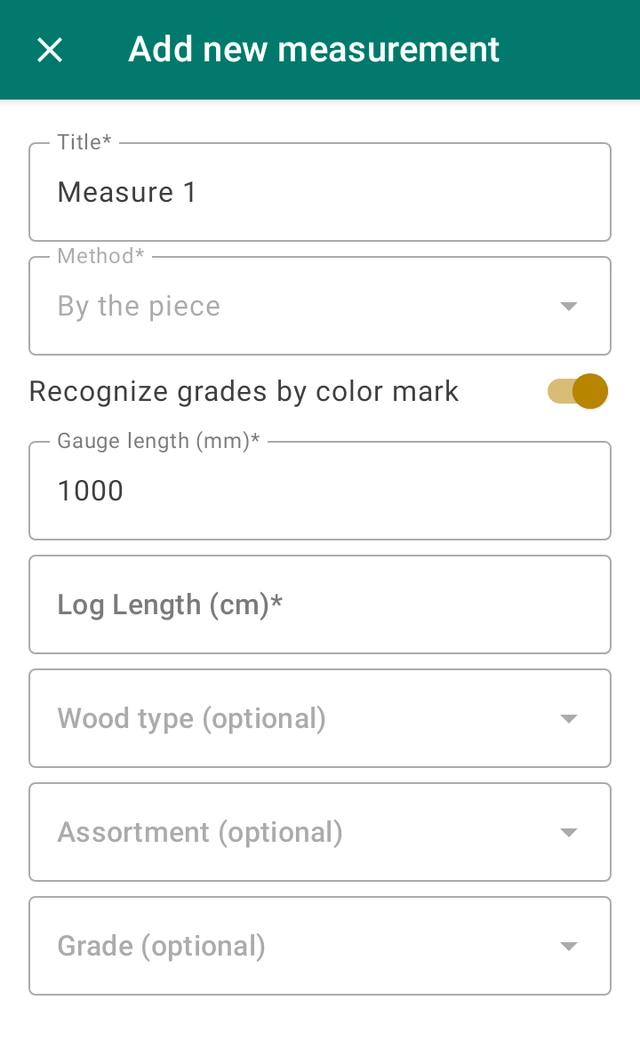
Choose how to measure — by the piece, as a pile, or a pile you outline by hand — and enter the log length.

Species, assortment and grade are optional. Reading the grades from paint marks is on from the start.

The new measurement form of the app: title, method, grade recognition switch, scale, log length, wood type, assortment and grade
Select

Open the app and set up the measurement

Choose how to measure — by the piece, as a pile, or a pile you outline by hand — and enter the log length.

Species, assortment and grade are optional. Reading the grades from paint marks is on from the start.

The new measurement form of the app: title, method, grade recognition switch, scale, log length, wood type, assortment and grade
Capture

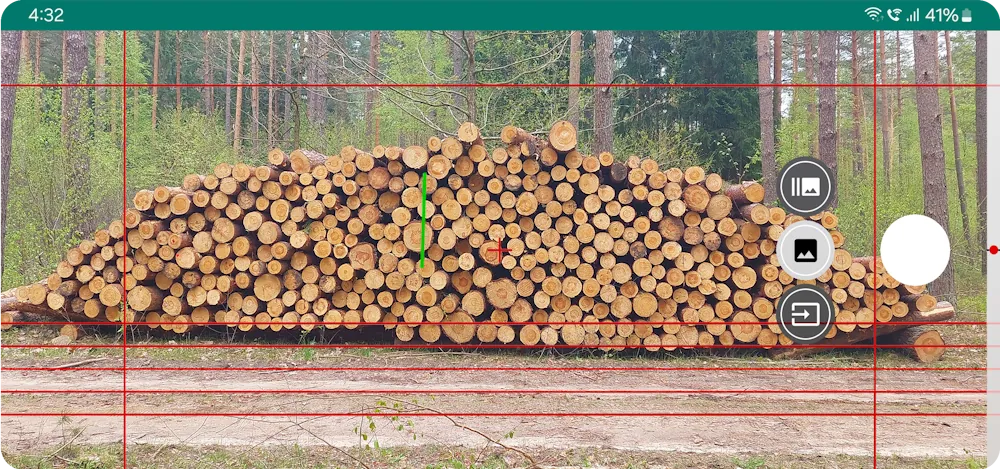
Photograph the stack — or record a walk along it

Put a gauge on the front of the pile so the photo has a scale: any stick of known length will do, and a chess gauge is found by the app itself.

Is the pile too wide for one frame? Switch to panorama and walk along it with the camera recording.

The camera screen of the app aimed at a log pile, with the grid and a gauge on the logs
Check

See every log marked on the photo

The app finds the logs, measures their diameters and reads their grade marks. Nothing is hidden: every log is drawn on the photo.

Add a log the app missed, remove a wrong one, or highlight only the diameters you need.

23.527.727.326.324.622.124.428.622.127.923.023.622.823.825.525.424.528.724.327.724.626.125.025.528.126.822.428.224.826.425.526.026.523.625.722.822.523.8CABAABCBACCCAACBBABCDBA
Share

Send the report — or the measurement itself

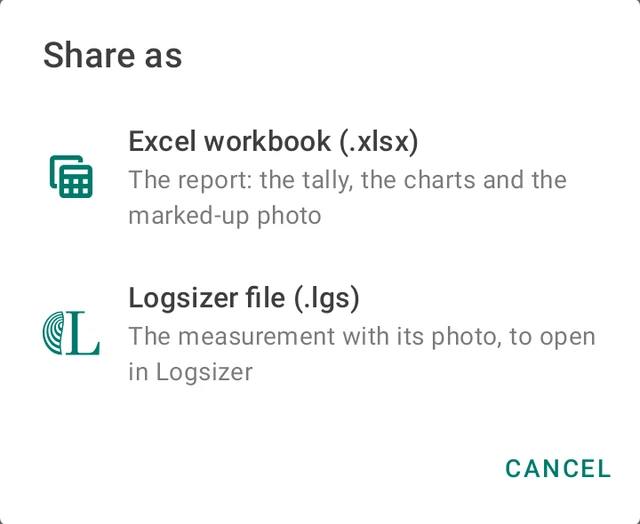
Export an Excel workbook with the tally, the charts and the marked-up photo, or send the measurement to another phone as a Logsizer file.

Your own Android app can receive the data through the public API, and for an ERP integration please contact us.

The Share as dialog of the app: Excel workbook (.xlsx) or Logsizer file (.lgs)

What’s new

The app has come a long way —
here is what a measurement can do now

30.535.630.330.432.034.631.229.436.637.034.230.731.236.633.3CDAAABCCABAAAC
Grading

Grades from paint marks

Mark the log faces with red, yellow, blue or green paint, and a measurement by the piece grades every log from A to D by the colour of its mark. On piles it had never seen, the app read more than 99% of the faces correctly. Grades show on the photo, in the tally and in Excel, and a misread one is corrected by hand.

gauge length
Gauge

A gauge the app finds by itself

A chess gauge is a red stick with a checkerboard marker at each end. The app locates both markers to a fraction of a pixel, so there is nothing to mark or adjust by hand. Any plain stick of known length still works.

walk, do not turn
Panorama

Walk along the pile, get one photo

A pile too wide for one frame is measured from a video of a walk along it. A guide on the screen keeps the phone level and on course, and the picture — one scale from end to end — is assembled in the background.

1000 mmHold the phone still
Experimental

No gauge at all, with a depth sensor

On the Zebra TC501 the depth (ToF) sensor measures the distance to the pile while the picture is taken: hold still for two to three seconds and the scale appears on the photo. If the depth data cannot be trusted, the app says why and asks for a gauge.

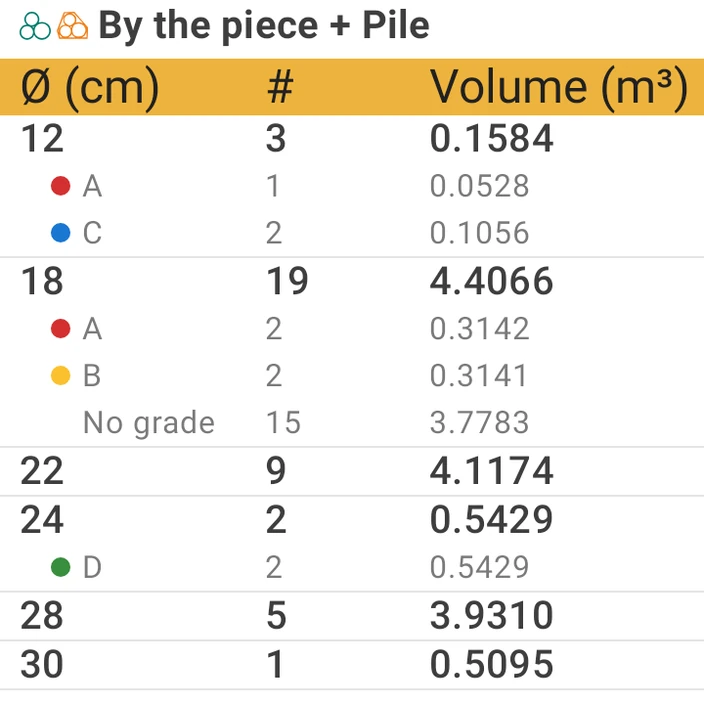
A screen of the app: the summary of a group, a table of diameters, log counts, volumes and grades
Analysis

Group summaries and diameter profiles

Collect measurements into groups and read one summary: totals per method, a combined tally, grades and your own diameter classes, coloured on the photo and totalled in the table. One tap exports the whole group to Excel.

Excel.xlsxLogsizer.lgsAPIJSON
Sharing

From phone to phone, from app to app

Send a measurement — photo, markup and all — to another phone as a Logsizer file (.lgs). Or let your own Android app ask Logsizer for a measurement and get back the numbers with the marked-up photo.

30.535.630.330.432.034.631.229.436.637.034.230.731.236.633.3CDAAABCCABAAAC
Grading

Grades from paint marks

Mark the log faces with red, yellow, blue or green paint, and a measurement by the piece grades every log from A to D by the colour of its mark. On piles it had never seen, the app read more than 99% of the faces correctly. Grades show on the photo, in the tally and in Excel, and a misread one is corrected by hand.

gauge length
Gauge

A gauge the app finds by itself

A chess gauge is a red stick with a checkerboard marker at each end. The app locates both markers to a fraction of a pixel, so there is nothing to mark or adjust by hand. Any plain stick of known length still works.

walk, do not turn
Panorama

Walk along the pile, get one photo

A pile too wide for one frame is measured from a video of a walk along it. A guide on the screen keeps the phone level and on course, and the picture — one scale from end to end — is assembled in the background.

1000 mmHold the phone still
Experimental

No gauge at all, with a depth sensor

On the Zebra TC501 the depth (ToF) sensor measures the distance to the pile while the picture is taken: hold still for two to three seconds and the scale appears on the photo. If the depth data cannot be trusted, the app says why and asks for a gauge.

A screen of the app: the summary of a group, a table of diameters, log counts, volumes and grades
Analysis

Group summaries and diameter profiles

Collect measurements into groups and read one summary: totals per method, a combined tally, grades and your own diameter classes, coloured on the photo and totalled in the table. One tap exports the whole group to Excel.

Excel.xlsxLogsizer.lgsAPIJSON
Sharing

From phone to phone, from app to app

Send a measurement — photo, markup and all — to another phone as a Logsizer file (.lgs). Or let your own Android app ask Logsizer for a measurement and get back the numbers with the marked-up photo.

Also new

  • A finished measurement can be measured the other way — as a pile or by the piece — on the same photo
  • The pile contour follows the pile’s outline and bridges the gaps where a log went undetected
  • Piles of small logs photographed whole are detected in full
  • The species list checked in every language, with corrected Latin names
  • Dark theme and Brazilian Portuguese

Benefits

You don’t need to buy any special equipment —
just your mobile phone and our app will do the job

Save time

With the app, you simply snap a photo of the entire stack and complete all measurements and the report in just under five minutes.

Manually measuring and compiling a report can take hours.
Entering data into reports manually also takes up a significant amount of time and often results in errors.

Get data you can verify

Image recognition measures every log the same way and automates both the measurements and the data entry. Each log stays marked on the photo, so a result can be checked at any time.

Create a safer workplace

Logsizer Pro makes logging safer by reducing physical interaction with log stacks and the amount of time spent in the heat, rain, or snow.

Measuring logs traditionally often needs to be done in harsh weather conditions, which can result in accidents.
Marking logs by hand is time-consuming, and requires additional team members and equipment.

Sort logs by diameter with one tap

You can easily find the exact diameter you need — just input the number, and the app will highlight the required logs within the stack.

Save time

With the app, you simply snap a photo of the entire stack and complete all measurements and the report in just under five minutes.

Manually measuring and compiling a report can take hours.

Get data you can verify

Image recognition measures every log the same way and automates both the measurements and the data entry. Each log stays marked on the photo, so a result can be checked at any time.

Entering data into reports manually also takes up a significant amount of time and often results in errors.

Create a safer workplace

Logsizer Pro makes logging safer by reducing physical interaction with log stacks and the amount of time spent in the heat, rain, or snow.

Measuring logs traditionally often needs to be done in harsh weather conditions, which can result in accidents.

Sort logs by diameter with one tap

You can easily find the exact diameter you need — just input the number, and the app will highlight the required logs within the stack.

Marking logs by hand is time-consuming, and requires additional team members and equipment.

Automate measurements, boost your efficiency

Get the app

Features

From photo to measurements to report —
get everything in just under 5 minutes

  • Three ways to measure

    By the piece, as a pile with its contour and density, or a pile you outline by hand. A finished measurement can be measured the other way on the same photo.

  • 13 log rules

    Cylinder volume, GOST 2708-75, the Poland rule, JAS, middle diameter, the Cubic Metre Rule, the Manitoba and Nova Scotia scales, Doyle, Scribner Decimal C, International ¼″, Ontario and Roy.

  • Reports in the units you need

    Logsizer supports metric m, cm, imperial ft, in and board foot measurements FBM. Easily switch between them in the settings.

  • Diameter profiles

    Define your own diameter classes: the logs are coloured by class on the photo, and each class gets its total in the tally and in the Excel workbook.

  • Group and combine measurements

    Organize your measurements into groups — by date, location, work site or client — and see one summary for the whole group.

  • Crop out unnecessary logs

    When there are several stacks in the photo, select only the stack, or the part of a stack, you want to measure.

  • Correct anything by hand

    Add a log, remove one, move the gauge, reshape the pile contour or change a grade — the result is recalculated at once.

  • Species, assortments, location

    629 wood species with their Latin names, assortments from sawlog to pulpwood, and the location where the measurement was taken.

  • Made for the field

    15 languages, light and dark themes, and all the measuring done on the phone itself: a photo leaves it only when you share it.

Pricing

Start free —
upgrade when you need the details

Demo

Free

Try the app on your own stacks.

  • Logs found on a photo or on a video panorama
  • Every diameter marked on the photo
  • By the piece, pile and manual pile
  • Chess gauge and corrections by hand
  • Groups, 15 languages, dark theme
  • Opens Logsizer files sent to you
Get the app
1 month free

Standard

Subscription

monthly or yearly

Everything in Demo, plus the numbers behind the photo.

  • Calculation details: the tally by diameter, volumes by your log rule, grades and diameter classes
  • Group summaries across many measurements
  • Export to Excel: the tally, the charts and the marked-up photo
  • Measurements sent to other phones as Logsizer files
  • Photos and videos from the gallery
  • Public API: measuring for your own app
Start the free trial

For companies

By agreement

The Standard features for a whole crew, set up by us.

  • Accounts activated directly — no purchases on each phone
  • Help with connecting Logsizer to your ERP or forestry software
  • A direct line to the team that builds the app
Contact us

The monthly plan starts with a free trial month for new subscribers; the yearly plan costs less than twelve monthly payments. Prices are shown in your currency in Google Play, where a subscription can be cancelled at any time.

For developers

Measure from your own app

Logsizer has a public API for Android. Your app starts Logsizer with one Intent; the user measures as usual — or picks a measurement made earlier — and presses Send. Your app receives the measurement as JSON together with the marked-up photo.

  • The request is optional: the method, the log length, a title and your own metadata, echoed back
  • The result: volume, the tally by the log rule, grades, pile geometry, species and location — or the logs as measured
  • Always metric, whatever the phone’s settings
  • Part of the Standard plan
Reference app and documentation on GitHub
val measure = registerForActivityResult(
    StartActivityForResult()
) { result ->
    if (result.resultCode == RESULT_OK) {
        // the measurement as JSON, and the marked-up photo
        val json = result.data!!.getStringExtra("measurement")
        val photo = result.data!!.data
    }
}

val request = """{"method": "pile", "length_cm": 300}"""

measure.launch(
    Intent("com.fosize.android.action.MEASURE")
        .setPackage("com.fosize.android")
        .putExtra("request", request)
)
Kotlin: asking Logsizer for a measurement

Roadmap

Released for Android: another app can ask Logsizer for a measurement and receive the result with the marked-up photo. Synchronization between the app and a client’s ERP system builds on it.
Experimental today: on the Zebra TC501 the depth sensor gives the photo its scale. We are trying it in the field to see how far it can go.
The panel will help manage accounts for multiple team members and customize settings based on the specific needs of the business.
Business requirements differ widely depending on the country, the industry and the area. This update will allow businesses to create custom fields according to their individual needs.
This feature will allow each log to be marked with a unique QR code. Scanning the code will give instant access to log-related data like species, dimensions, assortments or any other previously provided details. It will help to streamline documentation, reduce errors, and boost efficiency in the supply chain.
At this point, the app is only available on Android, but we plan to develop an iPhone version as well.

Subscribe to our newsletter

No spam, we take this seriously. Just occasional emails with the key info that can significantly enhance your workflow.

FAQ

Questions we hear most

What do I need to start?

An Android phone or tablet with Android 11 or later, the Logsizer Pro app from Google Play and a gauge — any stick of a length you know. Sign in with Google or an email address, and take the short tutorial the app offers on its first start.

The gauge gives the photo its scale. Put a ruler, a yardstick or any straight stick of known length on the front of the pile and enter its length. A chess gauge — a red stick with a black-and-white checkerboard marker at each end — is found on the photo automatically and needs no adjustment; its length is the distance between the centres of the two markers.

Switch the camera to panorama, press record and walk along the pile, keeping it in the middle of the frame — walk, do not turn. The app assembles one wide picture from the video. With the Standard plan, a video of such a walk can also be taken from the gallery, at 1080p or better.

Finding the logs and calculating the volume happen on the phone itself, so a measurement needs no connection. Signing in and confirming a subscription do: open the app where there is a network before heading out — a subscription has to be confirmed online about once a day.

It depends on the photo more than on anything else: shoot straight at the pile, keep the gauge on the log faces, and use the grid and the tilt indicator on the camera screen. Every log the app found is drawn on the photo with its diameter, so the result can be checked — and corrected by hand — before it is shared.

Thirteen rules: cylinder volume, GOST 2708-75, the Poland rule, JAS, middle diameter, the Cubic Metre Rule, the Manitoba Cubic Method, the Nova Scotia Cubic Metre Log Scale, Doyle, Scribner Decimal C, International ¼″, Ontario and Roy. Units are metric or imperial, with board feet for the board-foot rules.

The app is free to install and to try. The Standard subscription — monthly, with a free trial month, or yearly — adds the calculation details, group summaries, export and the API. For a team we set the accounts up directly: contact us.

On your phone. Photos and measurements leave it only when you share them — as an Excel workbook, as a Logsizer file or through the API. To move a measurement to another phone, send it as a Logsizer file.

Fifteen: English, Croatian, Czech, French, German, Hungarian, Japanese, Polish, Portuguese (Brazil), Romanian, Russian, Serbian, Spanish, Turkish and Ukrainian.

Not yet. Logsizer Pro is an Android app today; an iPhone version is on our roadmap.

Team

An international team with decades of experience in timber and software

Contacts

Contact us

Send us a message, and we’ll get back to you within 24 hours.

We’ll never share your email with anyone else. To read how we store and protect your data, check out our Privacy Policy.